In 1992 the Miami Herald first introduced GIS mapping to journalism in a significant way with their Pulitzer-winning reporting on the damage caused by Hurricane Andrew. A new era in investigative news mapping was beginning… However, fast forward (23 years!) and very few news organizations are taking advantage of modern cartography.
During ten years at National Geographic I was lucky to work with an amazing cartographic department that is highly skilled at using GIS software to produce detailed spatial analysis and (largely) automated mapping. GIS (Geographic Information System) software links location information in the form of databases with latitude and longitude coordinates to different types of information: demographic data to census tracts or divisions, election results to provinces, land use to natural or urban areas, etc. The user decides what layers (which may come from government or private sources) are going to be combined in order to visualize, analyze, and interpret the data to show relationships, patterns, and trends.

All oil and gas platforms, pipelines, leases, wetlands and protected area in the Guld of Mexico, made with GIS layered data. Copyright National Geograpic Society
A dismal state of affairs
During recent workshops in different countries I have been shocked to discover that 95% (if not more) of newspapers and magazines (particularly out of the US) still produce maps at a fairly basic level by taking screen grabs from Google Maps and painstakingly retracing them in Illustrator. Line by line, one push of the mouse after another. This procedure is the general standard today. These are of course simple geographic maps (large areas or cities) rather than the kind of thematic/data mapping that can bring visual insight to a story in a powerful way. I’ve been to a few newspapers that are the leaders in their respective countries and have never even heard the term GIS.
Why is GIS not ubiquitous in journalism in general and graphics departments in particular, as it is in many other industries? (disclaimer: I’m not a GIS user myself but I think it should be part of the skill set of any graphics department).
GIS packages such as ArcGIS or the Illustrator plugin MAPublisher are quite expensive, and the learning curve is high. There are free options such a QGIS (see a terrific tutorial by LA Times’ Len De Groot here), but newspapers rarely commit to diving in or understand its power. It’s amazing since there is so much to gain from GIS to uncover patterns though spatial analysis.
Are web mapping tools the new “GIS”?
Today, free web mapping tools like Tableau Public and Google Fusion Tables allow for easy and free data mapping. In many ways, these tools have somehow replaced the usage of GIS for journalists seeking to simply layer datasets to visualize spatial patterns. The Guardian and other major organizations have used them deftly in the past. But they don’t give the same analytical depth or access to GIS datasets.
D3.js can create nice interactive mapping as well (but you’ll need programming skills). TileMill from Mapbox, CartoDB are good online mapping tools, and you’ll also need some specialized skills.
Free maps!
In any case, for the “99%” out there (the occasional mapper or graphics departments that for whatever reason just need some base maps and can’t use GIS or even pay), here are three useful map sources:
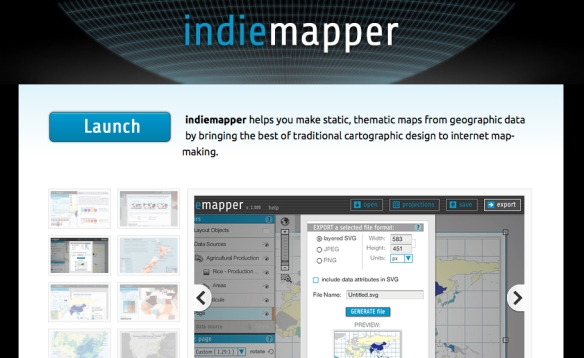
– Indiemapper. You can generate vector maps (physical or political), re-center and reproject them (let’s say from a flat world map centered in Europe to a globe centered in Asia) and export them as SVG files that you can open in Adobe Illustrator. Very useful! It can also importing KML (from Google Earth) and Shapefile formats.
– Natural Earth is a fantastic open source raster and vector map dataset at three different scales created by volunteer NACIS members and cartographers around the globe. Nathaniel Vaughn Kelso and Tom Patterson led the effort. In his fantastic Shaded Relief website, Tom Patterson (Chief Cartographer at the U.S. Park Service) offers some nice globes free to download and use (you can overlay the boundaries in Photoshop with a “multiply” effect). But of course, proper GIS software is what you would need to create your own customized visualizations and projections. These globes were create with Natural Scene Designer, a great package (and not that expensive) that is a favorite among National Geographic staff,
– OpenStreetMap is less known that I would have expected in newspapers: It’s an open source collaborative effort with really detailed maps down to the street level for most locations in the world. The Wikipedia of mapping, if you will. It’s a fantastic source and free to use (but do give proper attribution), but the export process to Adobe Illustrator is quite cumbersome, with additional software and plugins needed. You’ll need a fair amount of work to fix the ways masks layers and polygons get exported.
Your local government cartographic institutions may be just a click or phone call away with nice vector maps if you try them. If you download from the Internet, remember you can open PDF and SVG files in Illustrator, but make you sure you have the permission/rights to use what you find.
There are many free vector maps sources around that you can use (just Google them) and well as paid collections such as Mountain High Maps Plus, but none that I would recommend without a detailed review.
Note: I don’t endorse any particular program or intend to create a comprehensive review here. The mentioned software are just a few samples and I’m sure there are many other competent mapping solutions out there.


 5W Blog